

Hello Riddlers!
📌 📌 Set me as a preferred source on Google! Click here.
Warm Up
So we’ve heard…
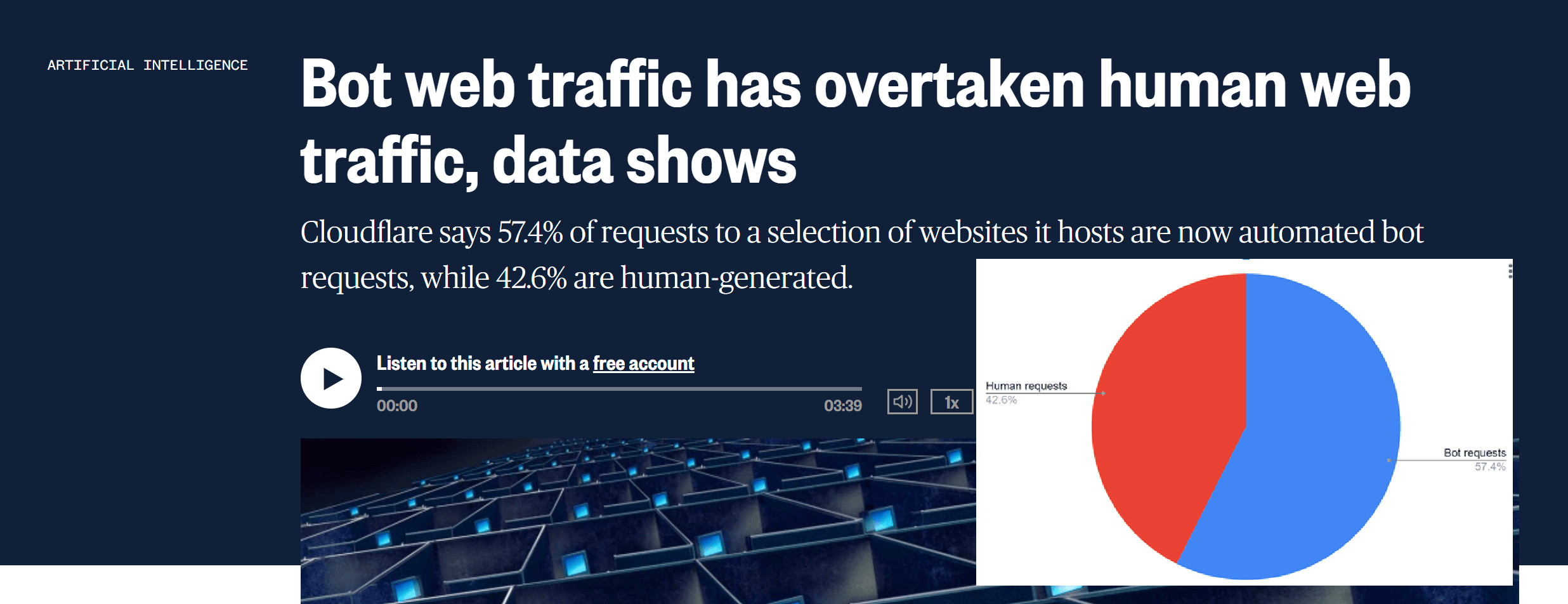
“Google search is AI search”, search is changing, and then cloudflare comes in and drops this data “Bot web traffic has overtaken human web traffic, data shows, for the first time” [1]
Google also added “agentic browsing audit” documentation to its lighthouse docs [2] that include reference to things like LLMs.txt after - also Google - repetitively telling us that LLMs.txt is not useful/important on various occasions 😂😂😂
It seems like we are trying to establish certainty in an environment where things are very dynamic and even the people building these systems don’t have all the answers yet.
Few topics capture this confusion better than LLMs.txt!
Over the course of several months, we heard:
Jun 18, 2025: “FWIW no AI system currently uses llms.txt”
Jul 22, 2025: noindex your LLMs.txt file
Jul 24, 2025: Google doesn’t support LLMs.txt and isn’t planning to
Aug 1, 2025: Why should AI systems trust a file that website owners can fill with whatever they want?
Dec 3, 2025: Google itself uploaded an LLMs.txt file for the Google Search Central portal (which is now gone btw 404-ing https://developers.google.com/search/docs/llms.txt but it still remains on many of Google’s other sites)
Jan 6, 2026: Google explains, they added LLMs.txt to their websites for other purposes
Jan 20, 2026: Google Search Team Does Not Endorse LLMs.txt Files
And on the other hand, we have reports that "Log file analysis shows that OpenAI crawls LLMs.txt file”


At this point, I think the entire industry deserves a group therapy session 😂
But all jokes aside, there are a few things we need to keep in mind:
When Google representatives speak publicly, they’re often speaking about specific products and teams. What applies to Google Search may not apply to other Google initiatives or to other companies entirely.
It was widely believed that Google doesn’t use metrics like CTR or bounce rate for rankings. But it turns out they do use other user behavior signals that are in the same general category🤷♀️. It just shows that there usually isn’t a simple yes or no answer, there are often a lot of details, and those details really matter.
We should stay open-minded about everything. A lot of things are still new to everyone. It helps to pause, think things through, test ideas, and then form your own conclusions. Also this isn’t something you do once and forget, it’s an ongoing process as more information keeps unfolding and technology continues to evolve..
In this new light💡here’s everything I know about getting your website ready for AI agents!
What agents do?
AI agents are software that performs specific tasks on your behalf autonomously. Unlike chatbots and LLMs, AI agents don’t just provide “answers”; they perform actual tasks, they can plan a trip for you, and make bookings for example.
“At its core, an agent is a system that receives input, interprets it, then plans and executes actions on behalf of the user” [3]
To do this, they need to browse the web, and be able to use your website.
In the AI-powered search era, we have three barriers we need to cross:
Discoverability: we need to be findable by different AI systems.
Citation and/or selection: being cited and selected as a source. And while AI agents may not provide outputs like AI mode and AI overviews for example, there has to be some type of mechanism where they narrow down the choices to start making decisions and taking actions.
Actions: can AI agents use your website? and that’s what we will focus on today!
Is your website screen reader friendly?
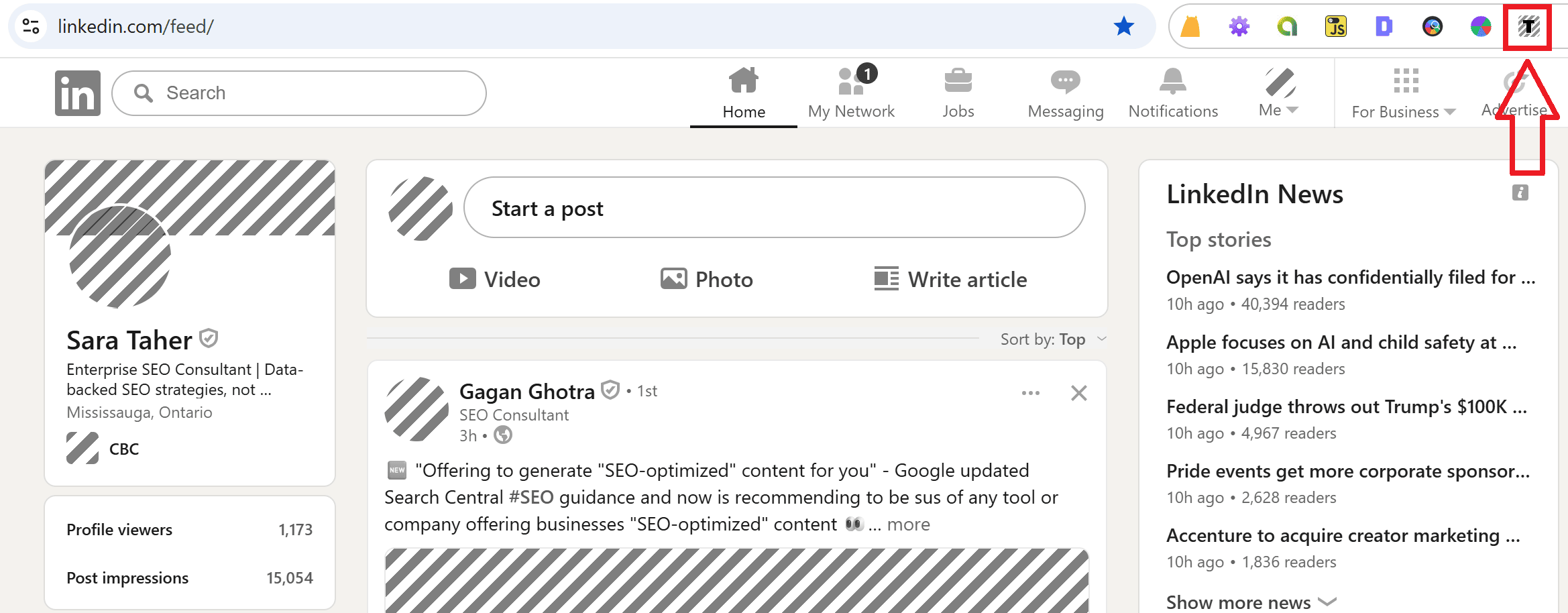
AI agents and screen readers use the accessibility tree as their primary roadmap to navigate websites and applications. This means that you can use chrome plugins like Text Mode to see how both screen readers and AI agents would see your website. Here’s a screenshot from my LinkedIn feed using this plugin:
What to tell your developers?
Use real HTML elements like
<button>,<nav>,<main>,<header>, and<footer>, and avoid replacing them with generic<div>containers just for styling. Make sure elements clearly describe what they do.Use
<button>for clickable actions, and avoid clickable<div>or<span>elements.Every input must have a
<label>that clearly explains what the field is for. For example, use “Email address” instead of relying only on placeholder text.Add appropriate
autocompletevalues to forms, such asname,email,tel,street-address, andorganization. This helps browsers and AI agents complete forms correctly.Use headings in order (
<h1>→<h2>→<h3>) and avoid skipping levels (for example, jumping from<h1>to<h4>). This helps agents understand the structure of the page and its sections.When building complex, custom, or dynamic user interfaces where native HTML elements do not provide the required functionality, use ARIA (Accessible Rich Internet Applications) attributes to fill those gaps.
Make sure important content is already present in the HTML when the page loads rather than being added later through JavaScript. Use Server-Side Rendering (SSR) so pages are fully built before they reach the browser. Avoid depending on JavaScript to display critical content, because AI agents may not run or fully process scripts. Anything important should not rely on user actions or client-side scripts to become available.
Use clear, descriptive link text that explains where a link goes. Avoid vague phrases such as “click here” or “read more.” Both users and AI agents rely on link text to understand the purpose of each link.
Google Lighthouse Agentic Browsing audit
If you download chrome canary (Chrome Canary is Google’s most experimental, cutting-edge version of the Chrome browser, designed primarily for developers, testers, and browser enthusiasts.), open your webpage, right click inspect, go to the lighthouse report, you’ll see that Google now has an Agentic browsing audit… ta-da!
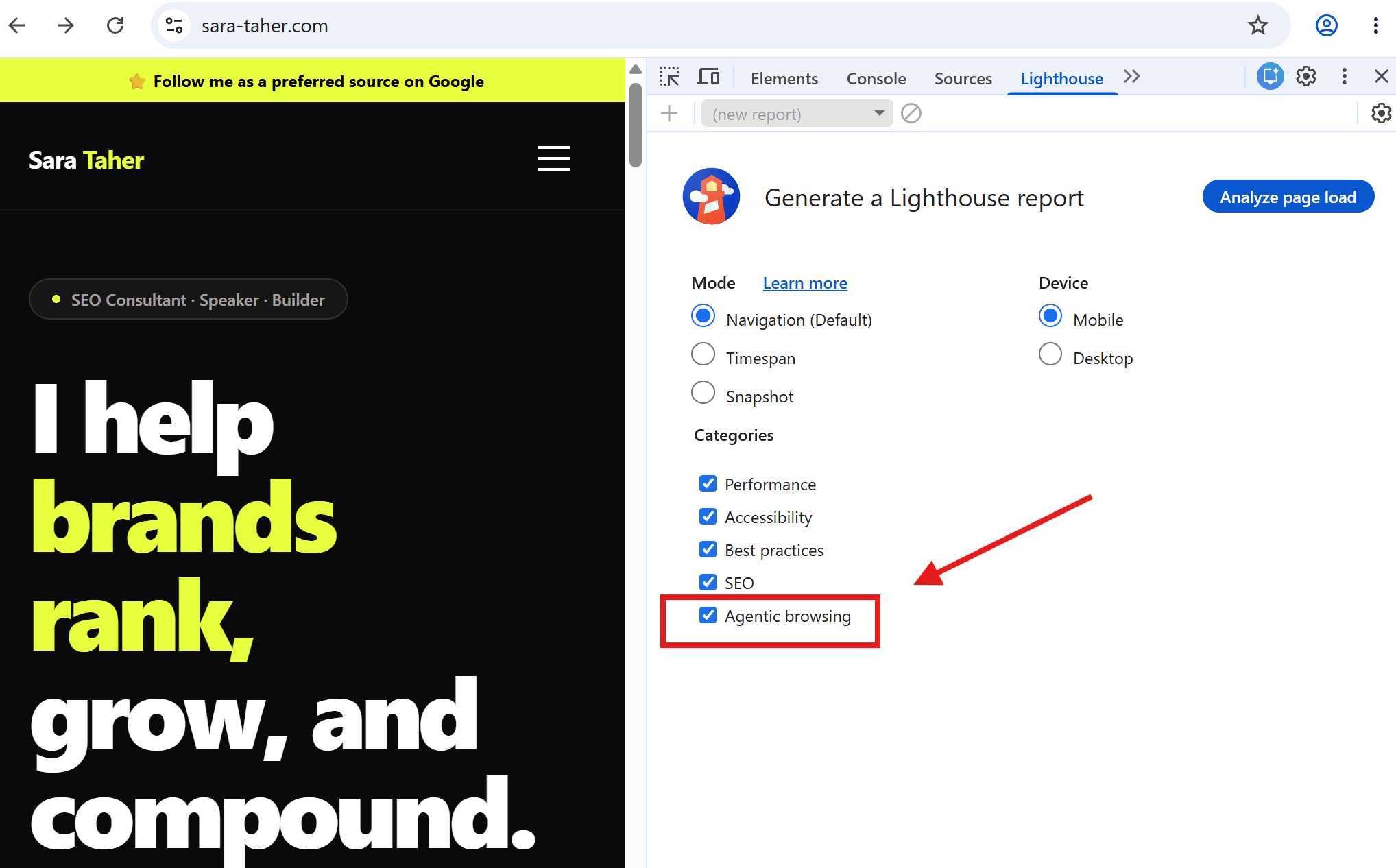
You can use this audit to help you assess your webpage for agentic browsing (clear from the name daah 😂)
If you don’t want to do all of this, and want just to know what to tell your developer, here you go:
What to tell your developers?
CLS (Cumulative Layout Shift) just got another importance boost outside of the core web vitals score. Your CLS score is a measure of UI stability for interaction precision.
LLMs.txt, (please don’t laugh, mute giggles are ok though) but Google’s own documentation recommends “Create an llms.txt file and place it in the root directory of your website (for example, https://example.com/llms.txt). The file should follow the llms.txt specification and provide a concise Markdown summary of your site’s purpose and key links.” [4]
Use WebMCP [5]. WebMCP is a proposed protocol that lets websites explicitly define and surface their “tools” (like forms, actions, and workflows) to AI agents in a structured way, instead of relying on agents to infer behavior from HTML, JavaScript, or UI interactions. In practice, it lets a site declare “this is a search tool,” “this is a checkout action,” or “this is a booking flow,” along with the required inputs and expected outputs, so agents can interact with it reliably and consistently.
Markdowns
Another highly controversial topic is adding markdowns to your webpages. Markdown is a lightweight markup language used to format plain text. It is widely used online for platforms like Reddit for example to format text in posts, comments, and community sidebars.
Google has added markdown files, .md.txt files, to the Google Search help documents [6]. Here’s an example.
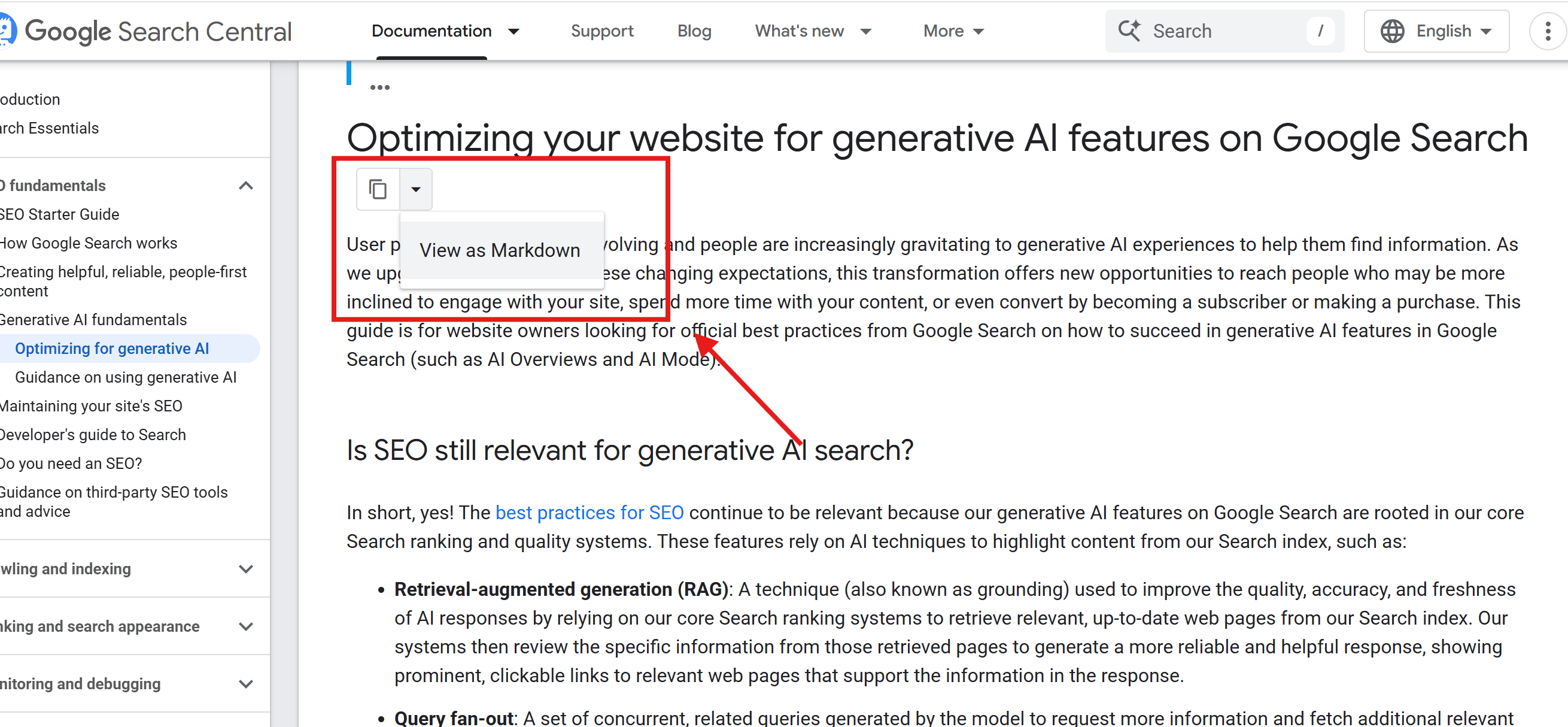
While John Muller explicitly said that “There were discussions around this on Linkedin a few weeks back. This is not being done for Search or generative AI responses in Search.” This does not mean that Markdowns are useless, they maybe used by AI agents.
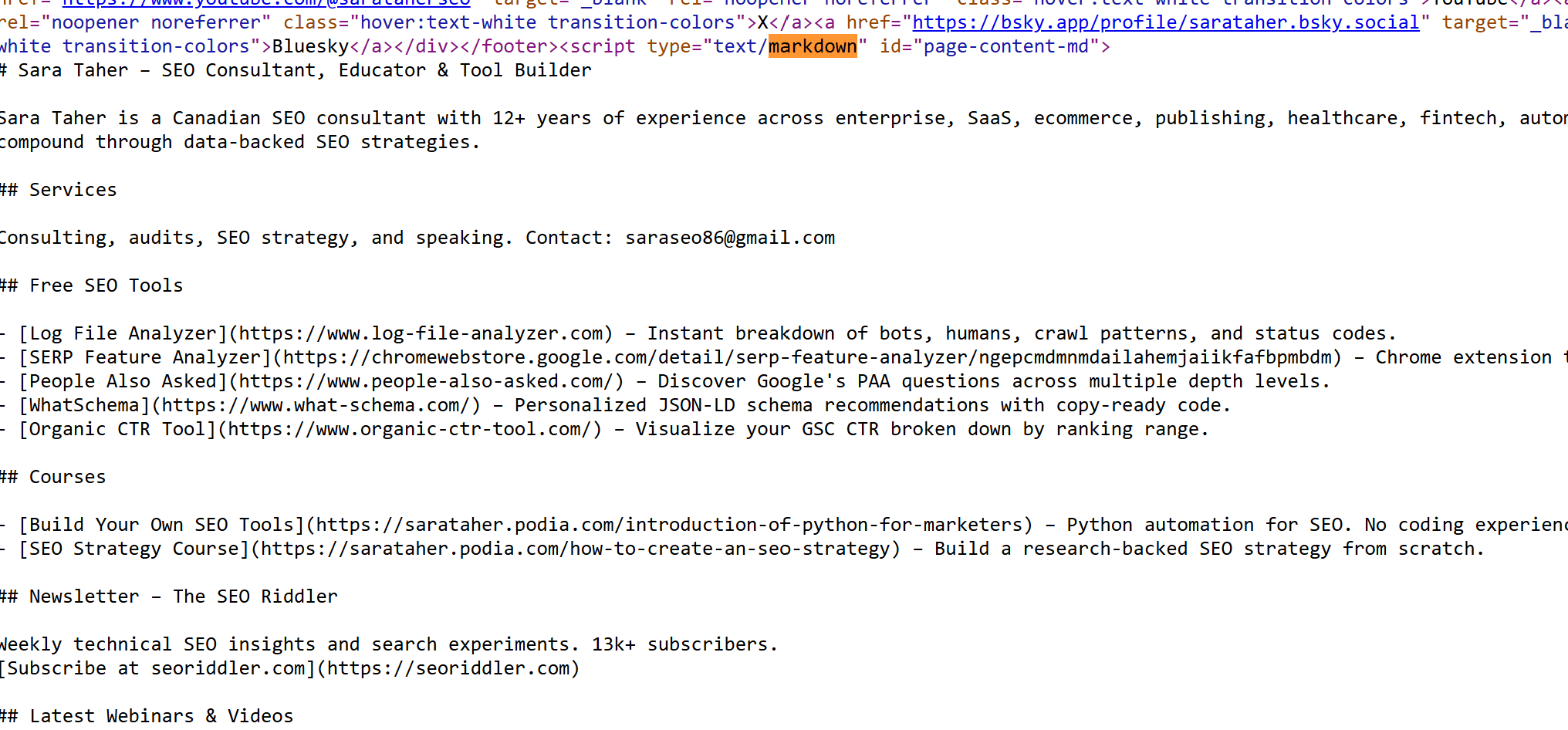
One tip though, do not create a markdown version of each webpage, because this may cause duplication. At the moment I’m testing adding markdown in the html of the page. You can use markdown between html tags as long as you add to the tags the markdown attribute with value 1. markdown=”1”
Here’s how this looks like on my website right now:
And That’s a Wrap (Almost 😄)
While a lot of the above recommendations are classics and have existed long before AI agents, some are very new and come with a lot of skepticism.
Keep an open mind, test things out, and keep learning.
That’s that for today folks and see you next newsletter!
Support the Riddler!
Sign up for my newsletter if you’re not already.
Share the newsletter and invite your friends to signup. Help me reach 2k signups by end of 2025 please 🙂
Provide feedback on how I can make this newsletter better!!!
If you’re an SEO tool or an SEO service provider, consider sponsoring my newsletter. I’m also open to other partnership ideas as well.
Disclaimer: LLMs were used to assist in wording and phrasing this blog.
Sources:
[1] Bot web traffic has overtaken human web traffic, data shows
[2] Lighthouse agentic browsing scoring
[4] llms.txt
[5] WebMCP
[6] Google Adds Markdown Files To Help Docs But Not Used For Search